POS software where the drawer has to agree with the ledger
Every outlet sells its own stock and banks into its own account, and every shift is one cashier on one counter between two timestamps — with the cash difference recorded against them. What the till took and what the books say it took are one figure.
A sale at the till is four entries by the time you look up
The queue does not wait while somebody decides which book to write it in. The counter takes the money; the stock, the ledger, the VAT and the customer’s history have already moved.
Inventory
The outlet’s own warehouse
Live available stock
Accounting
Outlet cash account
bKash Merchant Wallet
Sales Tax Payable
Sales
The same invoice list
POS/INV prefix
The customer
Purchase history
Ledger
One counter sale
Rung up on a counter inside an open outlet session, by a cashier who is checked in to it.
Which is why a shop that closes at nine does not need anybody at ten. The day is already posted.
What is in it
Everything the Point of Sale (POS) module covers
Outlet & Counter Management
An outlet is wired to a warehouse and to a cash account before it sells anything — so the shop draws stock from its own shelves and its takings land in its own account, not in a general pot.
A cashier checks in to a counter and checks out again. The session records who, which till, from when to when — and what the drawer was short or over by.
Counter billing against the same items, prices and VAT the rest of the business uses, producing an invoice that joins the same invoice list as everything else.
Cash, card, mobile wallet, or split across them. Each method settles into its own account, which is why bKash takings and drawer cash never have to be untangled later.
A return against the counter sale it came from, on the counter it came from — so a refund is netted off that till’s day rather than appearing from nowhere.
Four moments, and three of them are about knowing whose hands the money was in.
Open the shop
Somebody checks in to the outlet. That starts an outlet session that stays on-going until the shop closes.
Outlet
User
Start time
Opening balance
Open a till
Each cashier checks in to a counter inside it, so a shop with three tills has three sessions running under one outlet.
Counter
User
Check in
Check out
Sell, and take it back
Billing against live stock from the outlet’s warehouse, by cash, card or wallet. Returns go against the sale and the counter they came from.
Items
Payment method
Invoice
Return
Count the drawer
Closing the session records the closing balance and the difference between what is in the till and what should be.
Closing balance
Cash short or excess
Verify
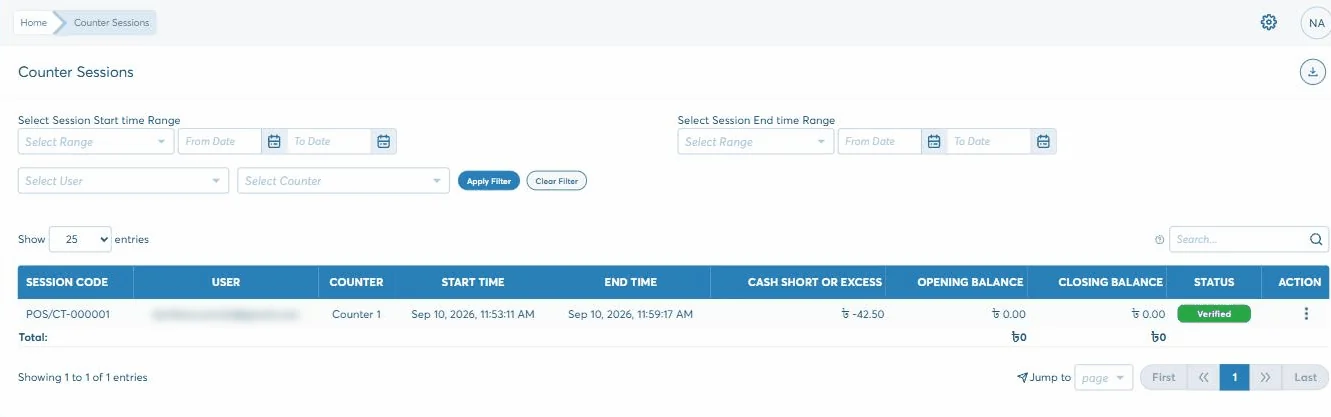
A counter session: one cashier, one till, two timestamps — and what the drawer was short by.
How it holds
Two things a till has to be honest about
Retail losses are rarely dramatic. They are small, frequent and hard to attribute, which is precisely what these two are for.
The drawer is counted, and the difference has a name on it
Every session records its opening balance, its closing balance and the cash short or excess between them — against a named user, a named counter and a start and end time. A till 42.50 down is a row in a list you can filter by cashier, not a rounding error somebody absorbs.
Total debit48,500.00
Total credit48,500.00
Difference0.00
An outlet’s takings belong to that outlet
Each outlet is tied to a warehouse and to its own cash account when you set it up. So it sells its own stock, and its cash builds up in its own ledger account rather than a company-wide one — which is what makes a per-shop figure possible at all.
Outlet
Counter
Session
Card and mobile-wallet takings settle into their own accounts the same way, so drawer cash and bKash never have to be separated afterwards.
Why it matters
Why a shop counter belongs on the same system
A standalone till gives you a Z-report and a problem: it knows what it sold, and nothing else in the business does until somebody types it in on Monday.
A cash difference is attached to a cashier, a counter and a six-minute window
Each outlet sells its own stock and banks into its own account
The shelf count drops as the shop sells, not overnight in a batch
Card, cash and mobile wallet settle separately, so nothing needs untangling
Counter sales join the same invoice list as everything else the business sells
A refund is netted against the till that gave it, on the sale it came from
What comes out
What you can see across the shops
Mostly on the session and invoice lists, filtered — by outlet, by counter, by cashier, by the hours a shift actually ran.
Takings by outlet
Takings by counter
Cash short or excess by session
Cash short or excess by cashier
Sessions still on-going
Counter returns against counter sales
Takings by payment method
Each outlet’s cash account balance
The last one is a ledger account, not a POS report — which is the point. What the shop took and what the books say it took are the same figure, arrived at once.
Getting started
How point of sale gets running
How long it takes depends on how you work and what has to come across from wherever it lives now. That is what the second step is for — and nothing is committed before it.
1
Start the trial
30 days, no card, nothing to install. Put a real week of your own work through it rather than a demo of ours.
2
A short discovery
We go through how you actually work — the documents, who should see what, and what has to come across into point of sale.
3
Set up and trained
Modules configured to that, roles set screen by screen, and your team taken through the parts they will each use.
4
Live, and still answered
Phone, email or online, from the team that built it. Nobody hands you to a reseller once the invoice is paid.
Questions
What a shop owner asks about it
Can I tell which cashier a shortfall came from?
Yes. A session is one cashier on one counter between two timestamps, and it records the cash short or excess for that window. The list filters by user and by counter, so the question is a dropdown rather than an investigation.
Does each shop have its own stock and its own cash?
Yes, and you set both when you create the outlet — a warehouse it sells from and a cash account it banks into. That is what lets you read one shop’s takings and one shop’s shelves separately.
What happens to stock when the counter sells something?
It comes off that outlet’s warehouse immediately. There is no overnight sync, because the counter is writing to the same inventory every other part of the business reads.
Can customers pay part cash, part card or bKash?
Yes, and each method settles into its own account. Drawer cash and mobile-wallet takings sit in separate ledger accounts from the moment of the sale, so nobody reconciles them apart later.
Do counter sales show up with the rest of the sales?
They join the same invoice list, on a POS/INV prefix, alongside order invoices and direct invoices. The running totals at the top of that list cover all three, so the day’s sales are one number.
Does it work with a barcode scanner?
Biznify has barcode templates for designing and printing the labels your products carry, and the counter bills against those items. Tell us which scanner you use and we will confirm it against your setup rather than guess.