Sales, stock, purchase, payroll and the accounts behind them — one system: enter a sale once, and the stock, the ledger and the customer all move with it.
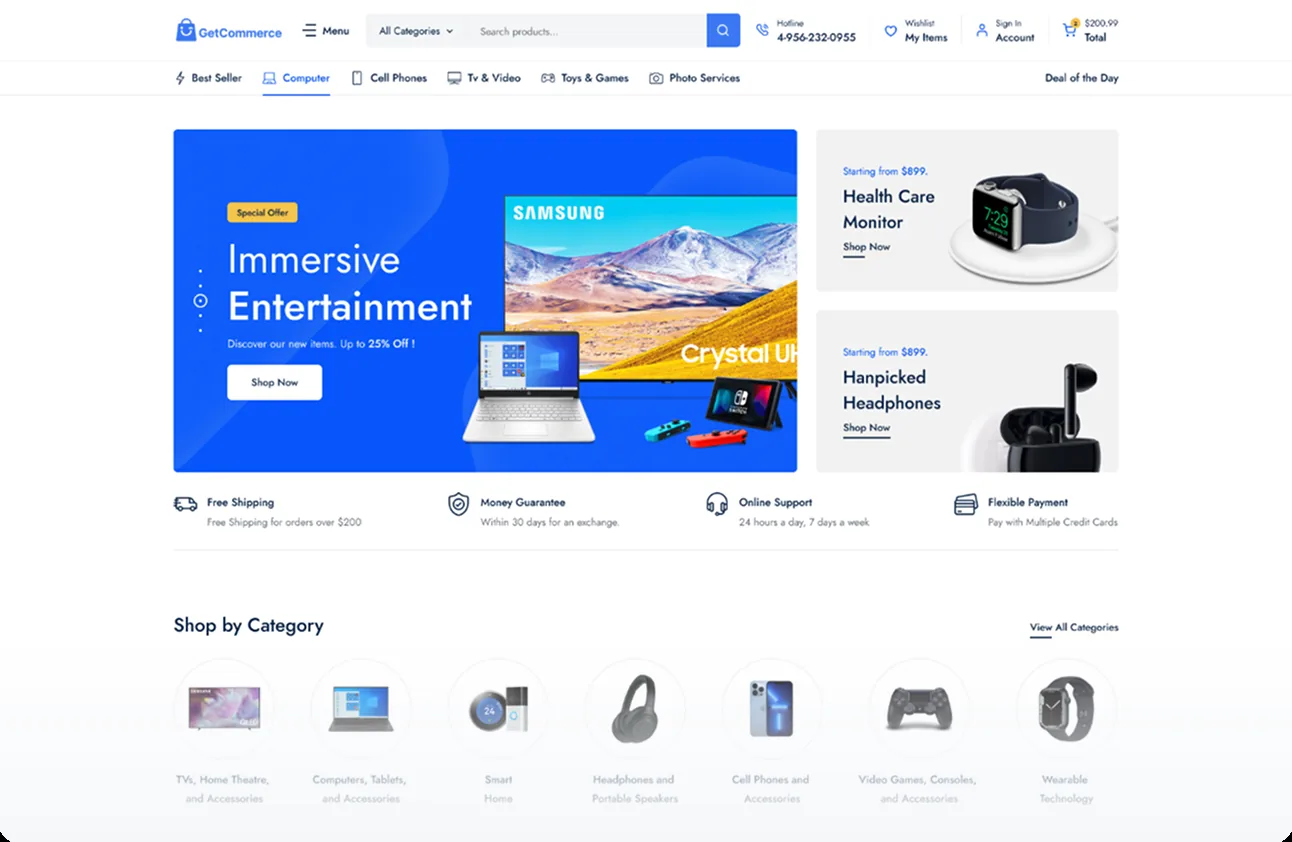
GetCommerce, our own e-commerce platform, runs the shop. Biznify runs everything behind it. A live API holds the two together, so products, stock, orders, payments and deliveries move between them as they happen.
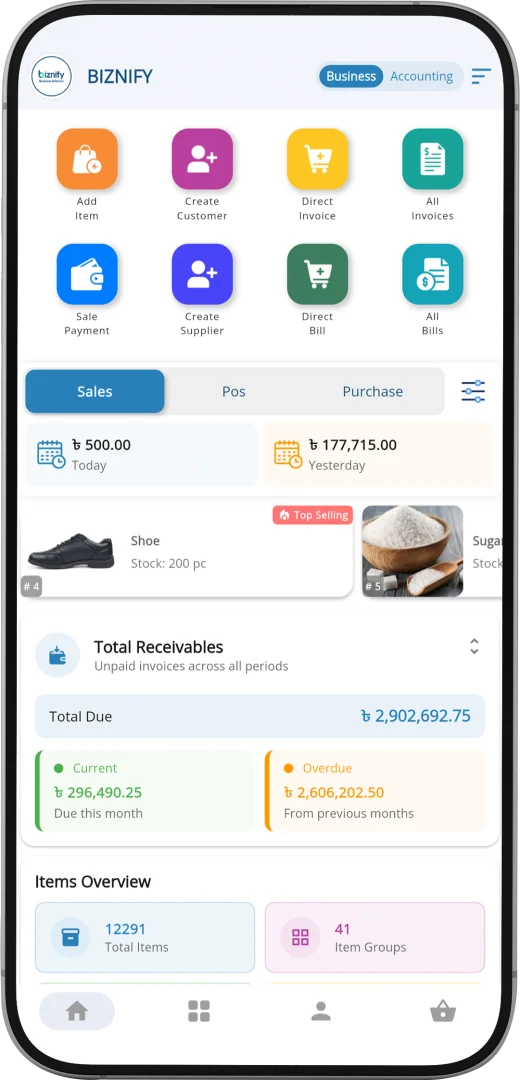
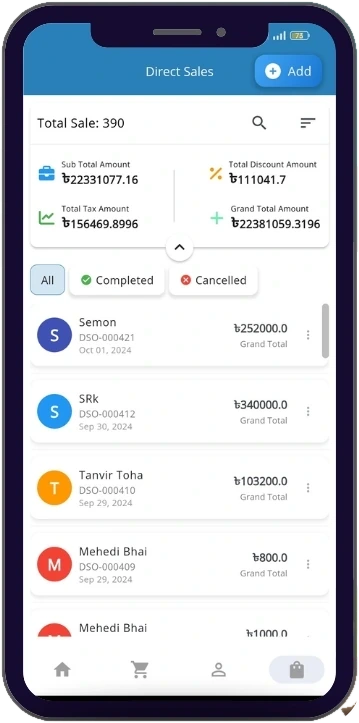
Raise an invoice at the counter, check what you are owed on the way home. What you enter on the phone is in the same records as the desk, the moment you save it.
Invoices and bills, raised where you are
Customers, suppliers and items added on the spot
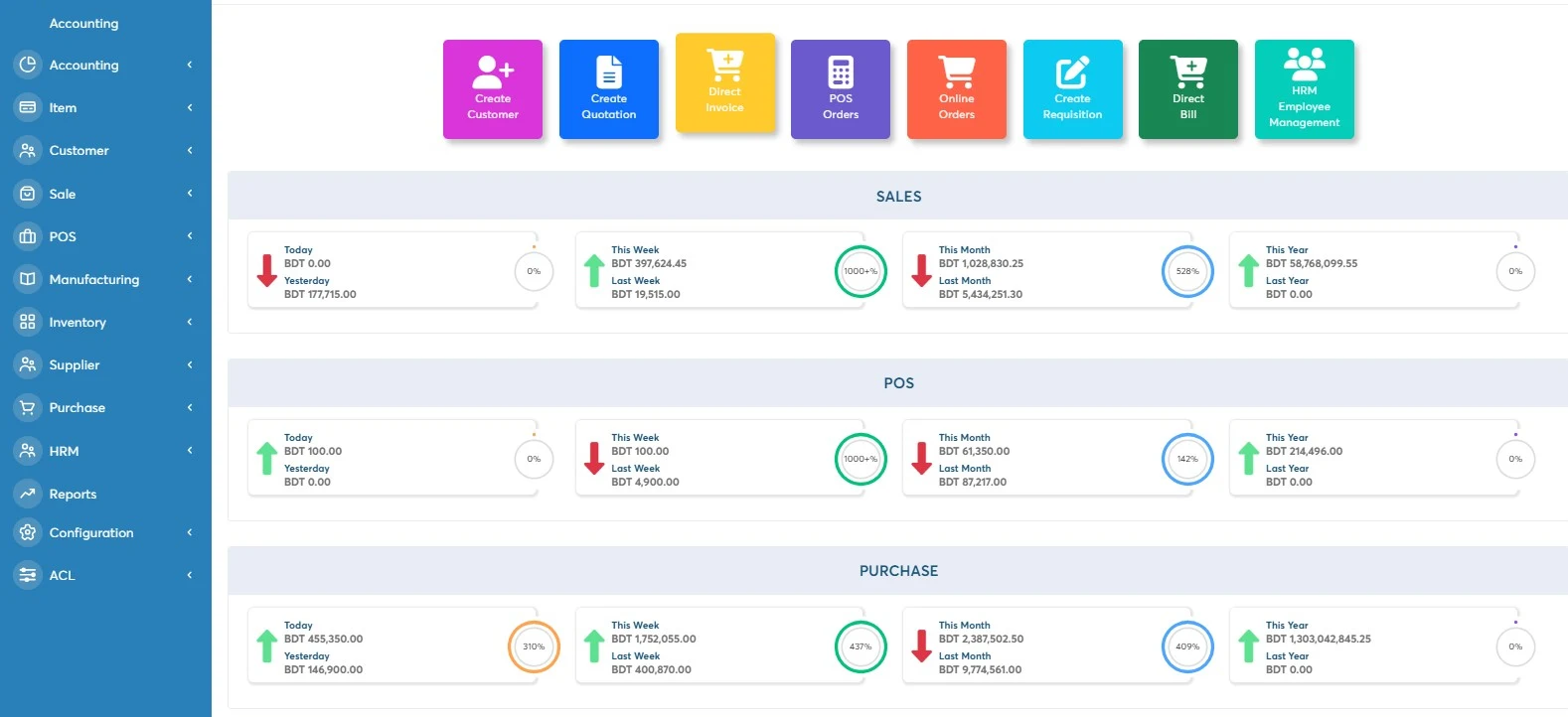
Today against yesterday — sales, POS and purchase
What you are owed, split into current and overdue
Cash, bank and mobile wallet in one place
Stock and top sellers without opening a laptop
Android only — on iPhone, Biznify runs in the browser.
Modules, workflows and reports built to how you work
Your data stays on your own infrastructure
Room to add as the business grows
One team builds it, one team supports it
Send us your requirements and we will come back with a written proposal covering the licence, the build and support — or book a meeting first.
5% VAT applies on top of every figure here.
Annual is twelve times the monthly figure, so paying yearly costs the same as paying monthly. See the full pricing page.
Why Biznify
Why businesses pick Biznify
What came in today, who owes what, who is allowed to see it, and what happens when you are not at the desk. These are the questions the week goes on — and what changes when the work is in one system.
One sale, entered onceAt the counter, on the phone, or straight off the storefront.
StockThe count falls, and the shelf figure is the one the shop sells from.
The ledgerThe entry posts itself, on the right accounts, with the VAT on it.
The customerTheir balance moves and the sale is on their history.
You can see the day without asking anyone
Today against yesterday, for sales, the counter and purchasing, on the screen you open first. No waiting until somebody has time to add it up.
You know who owes you, and since when
Everything unpaid in one figure, split into what is due this month and what has been sitting there since the last one. Chasing it stops being a memory exercise.
Your people can work without seeing everything
Every screen has its own view, create, update and delete boxes, set per role. The person on the counter sees the till, not the payroll and not what you paid for the stock. Regular backups behind it.
What you already pay for is already connected
bKash, Nagad and SSLCommerz. Pathao, REDX and eCourier. Three SMS gateways. And GetCommerce, the storefront, is ours too — so an online order arrives ready to invoice instead of being copied across by hand.
It works when you are not at the desk
Raise an invoice from the counter, check what you are owed on the way home. The phone shows the same records the office does, the moment you save.
It costs little to find out, and somebody answers
30 days free with no card, then ৳ 1,000 a month for one user. Onboarding, training and the person who picks up the phone are all Softifybd — nobody hands you to a reseller.
Some businesses need Biznify shaped around them: a workflow of their own, a connection to a system they already run, reports built for the people who read them, or years of records brought across. Tell us what yours needs and we will say plainly what is configuration, what is custom work, and what it would cost.
From retail to manufacturing, companies rely on Biznify’s ERP solution to stay organized and grow faster.
Biznify has completely transformed how we manage our business. From inventory tracking to sales and accounting, everything is now in one place. The local support team is responsive, and the system is surprisingly easy to use. Highly recommended for any growing business in Bangladesh.
Biznify has really simplified how I manage my small business. The accounting section helps me keep track of everything from expenses to income, and the inventory management is straightforward. It’s not overly complicated, which is exactly what I need.
Biznify covers a lot of ground. I use it for accounting, sales, and inventory, and while it’s powerful, it took me a little while to get used to all the features. Once I got the hang of it, though, it really started saving me time.
I’ve been using Biznify for a few months now. The purchase order and vendor management are particularly useful, and it’s nice to have everything in one place. The system does have a bit of a learning curve, but once you get familiar with it, it becomes much easier to navigate.
Biznify made our operations smoother and faster. Everything from inventory to accounting is now in one place. Super easy to use and very reliable. Highly satisfied!
We switched to Biznify a few months ago, and it’s been a game-changer. No more scattered systems — everything’s in one place now.
Great ERP with strong features and smooth performance. Biznify helped us reduce manual work and improve team collaboration.
We started using Biznify ERP for our business, but unfortunately, the onboarding process took over a month longer than the initially committed time, which caused some operational delays on our end. That said, once we got started, the software has been quite helpful for managing our business operations. While there are still a few limitations, the system is user-friendly and serves our day-to-day needs effectively. What we appreciate the most is the responsive support team. Whenever we need assistance, their team is available and ready to help, which adds a lot of value to the overall experience. We hope to see continuous improvements in the platform and wish the Biznify team all the best in their journey ahead!
Biznify has completely transformed how we manage our business. From inventory tracking to sales and accounting, everything is now in one place. The local support team is responsive, and the system is surprisingly easy to use. Highly recommended for any growing business in Bangladesh.
Biznify has really simplified how I manage my small business. The accounting section helps me keep track of everything from expenses to income, and the inventory management is straightforward. It’s not overly complicated, which is exactly what I need.
Biznify covers a lot of ground. I use it for accounting, sales, and inventory, and while it’s powerful, it took me a little while to get used to all the features. Once I got the hang of it, though, it really started saving me time.
I’ve been using Biznify for a few months now. The purchase order and vendor management are particularly useful, and it’s nice to have everything in one place. The system does have a bit of a learning curve, but once you get familiar with it, it becomes much easier to navigate.
Biznify made our operations smoother and faster. Everything from inventory to accounting is now in one place. Super easy to use and very reliable. Highly satisfied!
We switched to Biznify a few months ago, and it’s been a game-changer. No more scattered systems — everything’s in one place now.
Great ERP with strong features and smooth performance. Biznify helped us reduce manual work and improve team collaboration.
We started using Biznify ERP for our business, but unfortunately, the onboarding process took over a month longer than the initially committed time, which caused some operational delays on our end. That said, once we got started, the software has been quite helpful for managing our business operations. While there are still a few limitations, the system is user-friendly and serves our day-to-day needs effectively. What we appreciate the most is the responsive support team. Whenever we need assistance, their team is available and ready to help, which adds a lot of value to the overall experience. We hope to see continuous improvements in the platform and wish the Biznify team all the best in their journey ahead!
Businesses of every size run their sales, stock and accounts on Biznify
Questions
Frequently Asked Questions
The questions buyers ask before they commit a business to a system.
What is ERP software and how does it work?
ERP software connects key business tasks like sales, purchasing, inventory, accounting, and HR into one system. When data is entered once, it becomes available across related modules, so teams do not need to repeat the same work in different tools. This makes reporting faster and reduces mistakes.
Why choose Biznify?
Biznify helps businesses manage accounting, sales, inventory, HR, and reporting in one connected platform. It reduces double entry, keeps data organized, and improves visibility across daily operations. You can start with the modules you need and expand later as your business grows.
How do I know if my business needs an ERP system?
If you manage sales, stock, and accounts in separate tools or spreadsheets, it usually creates mismatches and delayed reports. You likely need an ERP when you cannot track stock confidently, reporting takes too long, or errors keep repeating. A centralized system helps you work faster with one source of truth.
How much does ERP software cost?
ERP pricing depends on your business size, the modules you need, and how many users will access the system. Biznify offers subscription plans so you can start with essential features and add more modules as you grow. Plans start at ৳1,000 a month for one user, plus 5% VAT.
What features and functionalities does Biznify provide?
Biznify includes accounting, sales and invoicing, inventory, purchasing, HR and payroll, CRM, manufacturing, multi location management, and reporting dashboards. These modules stay connected, so updates in sales, stock, and accounts reflect consistently across the system.
Is Biznify suitable for small businesses and enterprises?
Yes. Biznify works for startups, SMEs, and growing companies. You can begin with the modules you need today and expand later. It also supports structured roles and access control, which helps when teams and operations become larger.
How long does ERP implementation take?
Implementation time depends on your business process, module selection, and data readiness. Many businesses can start onboarding quickly with guided setup, user training, and structured configuration. A short discovery step helps confirm workflow, user roles, and data migration needs before going live.
What training and customer support do you provide?
Biznify provides onboarding support, user training, and ongoing help from our own team. Support is available through phone, email, and online channels. The goal is to help your team adopt the system smoothly, solve issues quickly, and keep operations running without confusion.
Does Biznify integrate with my current software?
Biznify can integrate with payment gateways, e-commerce platforms, and selected external tools depending on your setup. This helps reduce manual entry and keeps key data synced across systems. Tell us which tools you use and we will say plainly what connects and what does not.
Can I manage multiple locations with Biznify?
Yes. You can manage multiple branches, stores, warehouses, or counters from one dashboard. Stock movement, sales, and reports can be viewed by location, or combined for an overall picture. This is useful for businesses that operate in more than one place.
Can I access Biznify on my mobile devices?
On Android, yes — Biznify is on Google Play, carrying accounting, inventory, POS, HR, customers and suppliers, sales and purchase. On iPhone there is no app, so you would use Biznify in the browser.
How does Biznify ensure data security and privacy?
Biznify uses access control and secure handling of data to protect your business information. User roles help limit who can view or edit sensitive sections, and there are 44 roles with permissions set per screen. The system also supports regular backups to reduce the risk of data loss.
Blog
Stay Informed with Our Blogs
Read expert ERP guides, industry tips, and case studies on how businesses succeed.