Sales software that lets one order finish in pieces
Half now and half next week is how most orders actually go out. An order here carries its own delivery status and its own invoice status, separately — so part-shipped and part-billed is a state the system has a word for, not a spreadsheet you keep on the side.
The moment a delivery goes out and an invoice is raised, the stock has moved, the revenue is booked, the VAT is a liability and the customer owes you. None of that is a second piece of work.
Inventory
Stock out on delivery
Per warehouse
Accounting
Sales
Accounts Receivable
Sales Tax Payable
Delivery
Delivery channel
Consignment ID
Channel charge
The customer
Ledger
Outstanding balance
Credit memos
A sales order
From a quotation or straight off the phone, against a customer on your list and their own price list.
A counter sale and a direct invoice take the same four paths. They differ in how the sale started, not in what it does.
What is in it
Everything the Sales module covers
Quotation
A quote with its own valid-till date, and a filter for finding the ones about to expire. When it turns into an order its status says so, and the order keeps the quotation number.
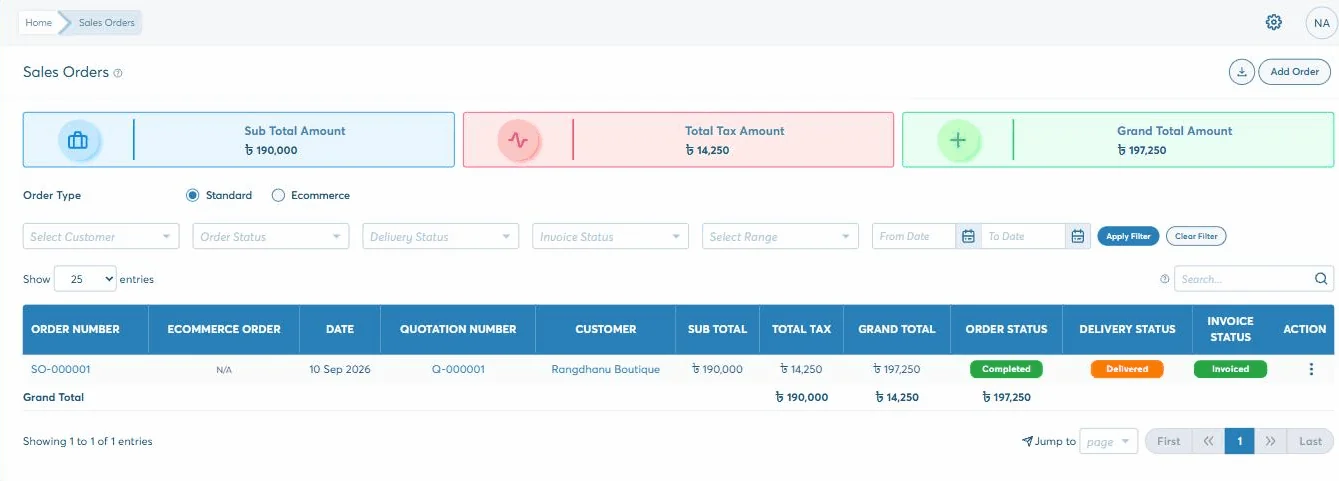
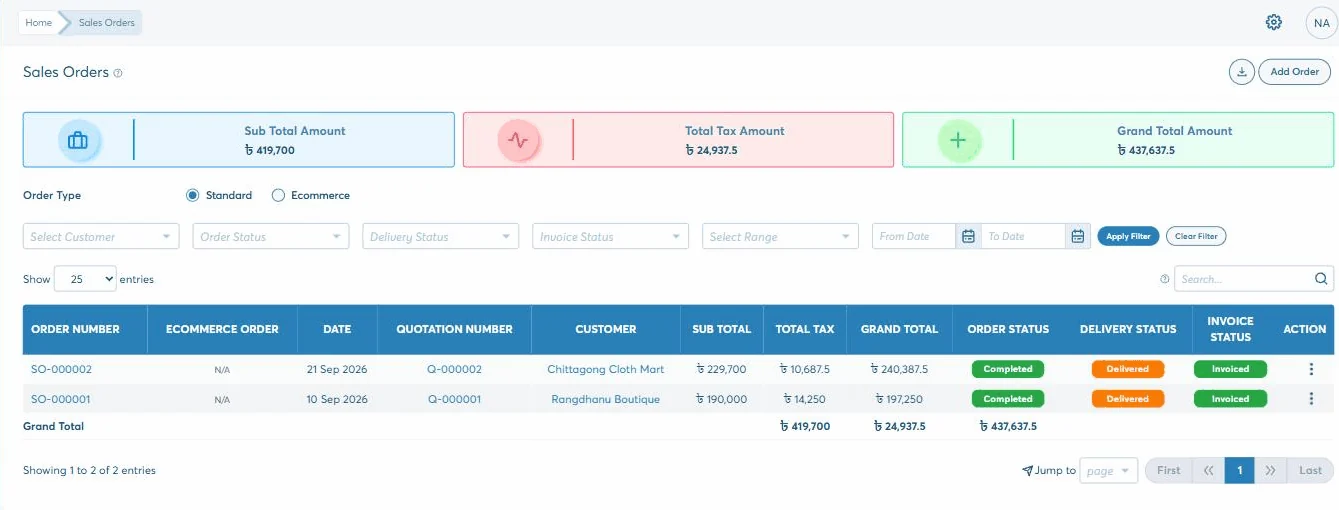
Three statuses on one row — the order, the delivery and the invoice — because those three things finish at different times. Each line tracks ordered, delivered, billed and returned.
Store pickup or a courier, with the delivery channel, its charge and the consignment ID on the record. An order can take as many deliveries as it needs.
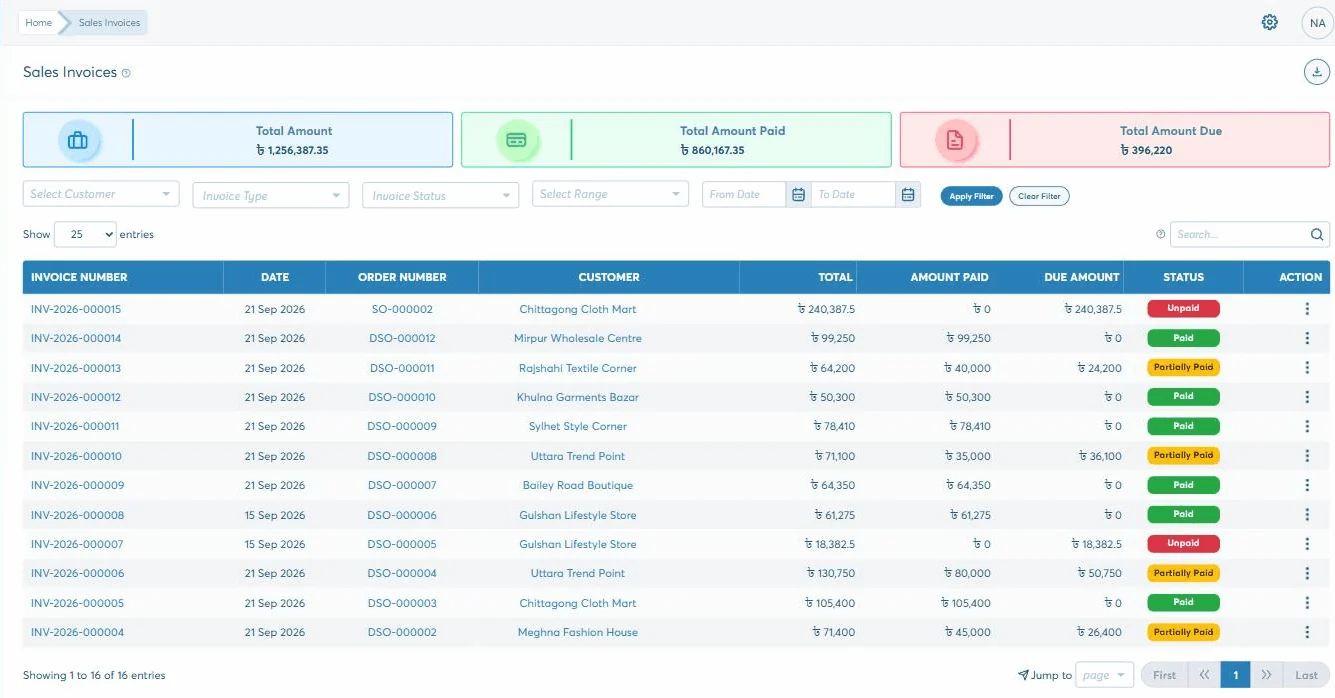
Invoice the whole order or the part that has gone. Every invoice — from an order, a direct sale or the shop counter — lands in one list with its total, paid and due.
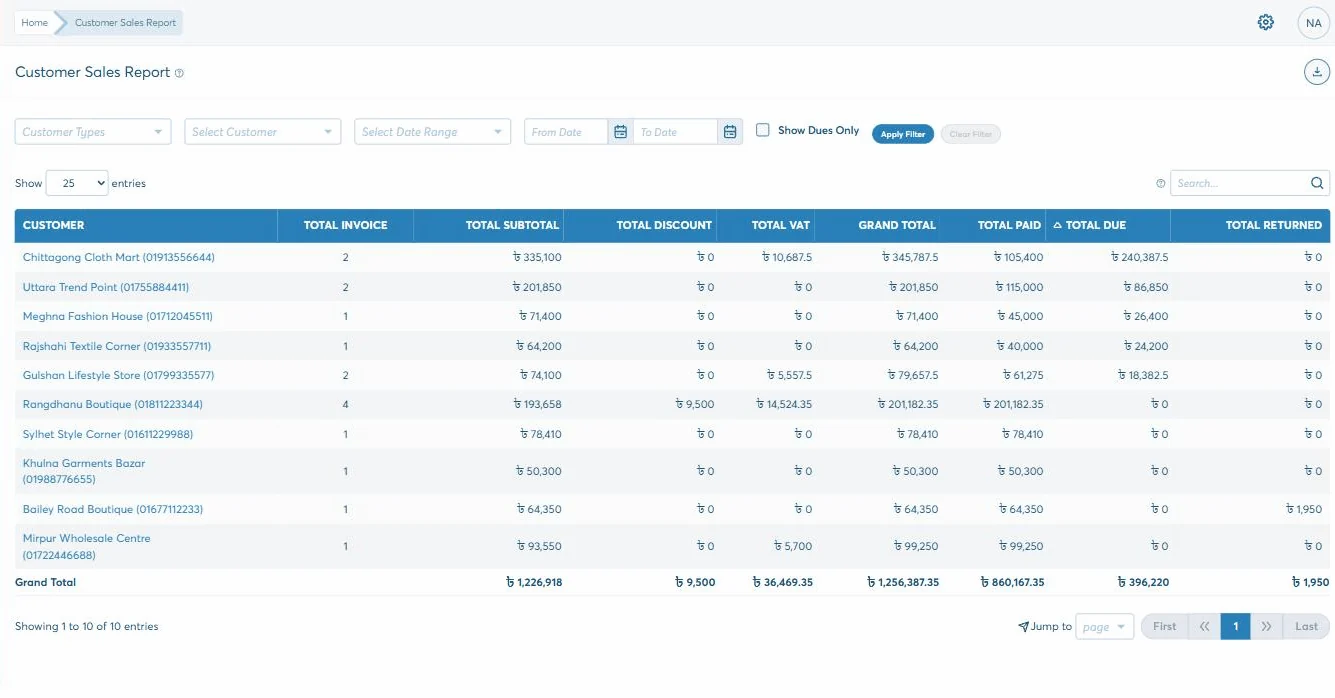
What each invoice has taken and what is still owed, by customer, by status and by date range — with the three running totals at the top responding to the filter.
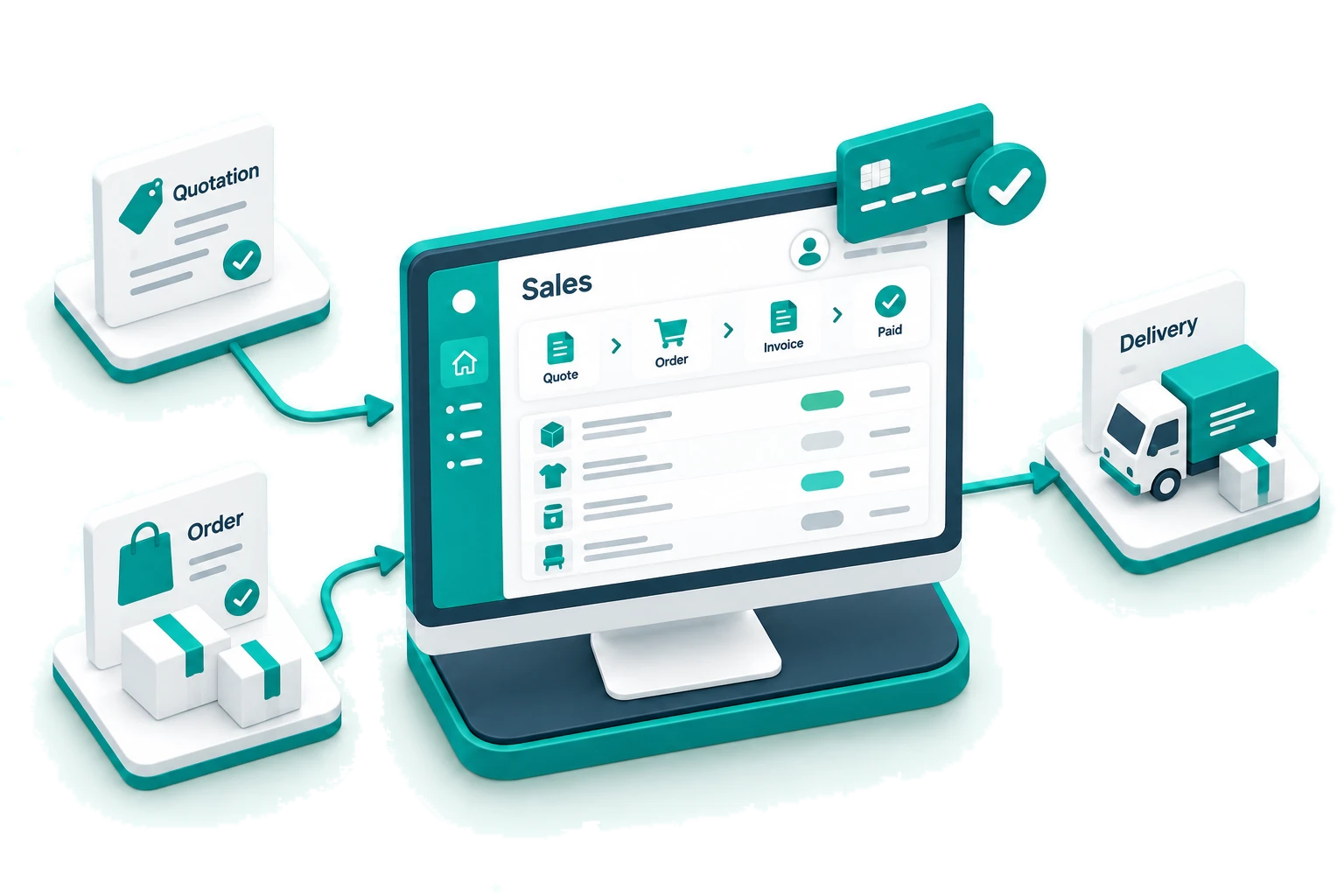
Five steps, and you can start at any of them — a shop sale skips to the fourth, a wholesale order walks the lot.
Quote it
With a valid-till date, so a price you gave in March is not still binding in August. The list can be filtered by that date alone.
Customer
Valid till
Lines and VAT
Notes and terms
Turn it into an order
The quotation’s status becomes Ordered and the order keeps its number, so the two are tied without anyone writing it down.
Order person
Reference
Expected delivery date
Discount
Send some of it
A delivery against the order — store pickup or a courier, with the channel and consignment ID kept. As many deliveries as it takes.
Delivery type
Channel
Consignment ID
Charge
Bill and get paid
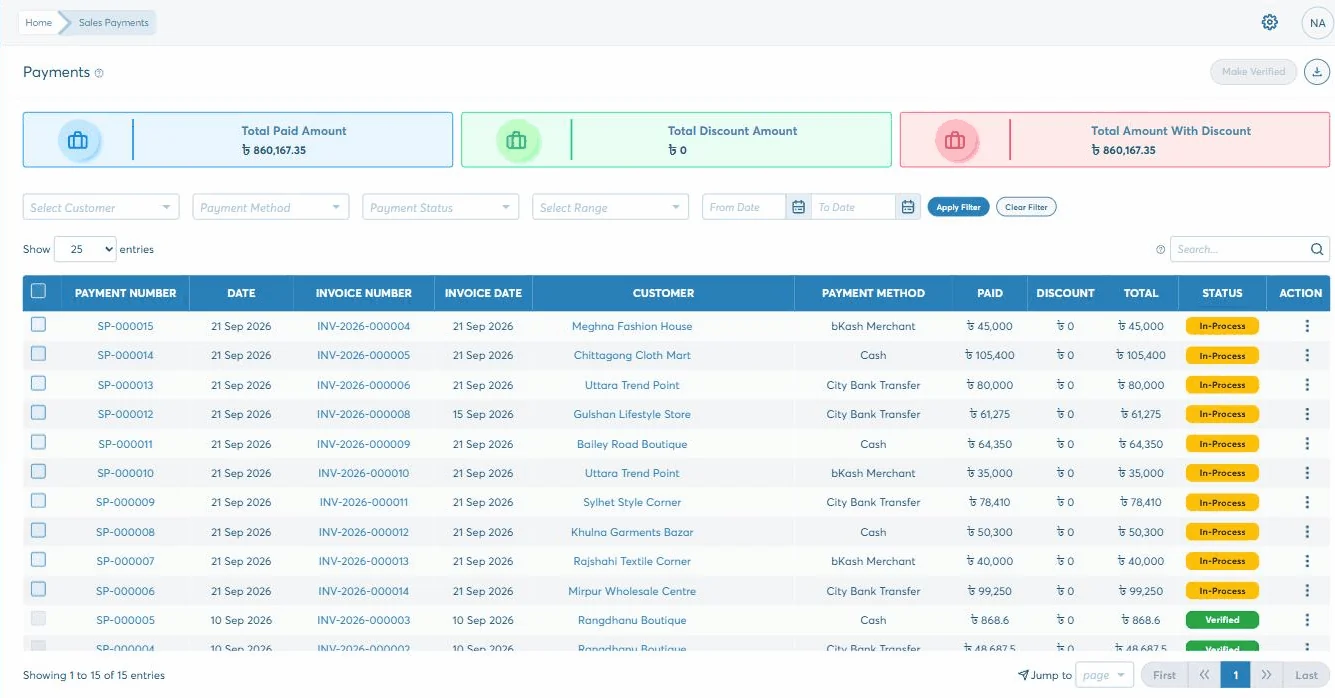
Invoice all of it or the part that has gone, then take payment — in instalments, or one receipt across several invoices.
Invoice
Amount paid
Due
Batch payment
One row, three statuses. The order, the delivery and the invoice finish at different times, so each keeps its own column.
How it holds
Two things that stop an order lying to you
Both come from the same idea: agreeing to sell something, handing it over and charging for it are three events, and they rarely happen on the same day.
Delivered and invoiced are different columns
One row carries an order status, a delivery status and an invoice status side by side, and each line underneath tracks ordered, delivered, billed and returned. So "we shipped it but never billed it" is a filter, not a discovery. You can list every order that is Delivered and Not Invoiced in two clicks.
Total debit48,500.00
Total credit48,500.00
Difference0.00
Part-billing still has to add up to the order
This order went out on two deliveries and was billed on two invoices — 148,562.50 and 48,687.50 — which come to the 197,250 the customer agreed to, and not a taka more. The order is only Completed once there is nothing left to deliver or invoice.
Approved
Delivered
Invoiced
Sales from the shop counter and one-off direct invoices arrive in the same invoice list, on their own prefixes, so the day’s takings are one figure rather than three.
Why it matters
Why the order book moves in here
Almost every business we meet has the orders in one place, the deliveries in a driver’s head and the invoices in accounts. The money that goes missing is in the gaps between those three.
You can list what has shipped and never been invoiced — in two clicks
A quote carries an expiry date, so old prices stop being binding
One order can take as many deliveries and as many invoices as it needs
Part-billing still has to add up to what the customer agreed
Counter sales, direct invoices and order invoices land in one list
Stock, revenue, VAT and the customer’s balance all move on the same click
What comes out
What you can ask it
The three figures across the top of the invoice list — total, paid, due — answer to whatever you have filtered to, which covers most of what people open a report for.
Customer sales
All invoices
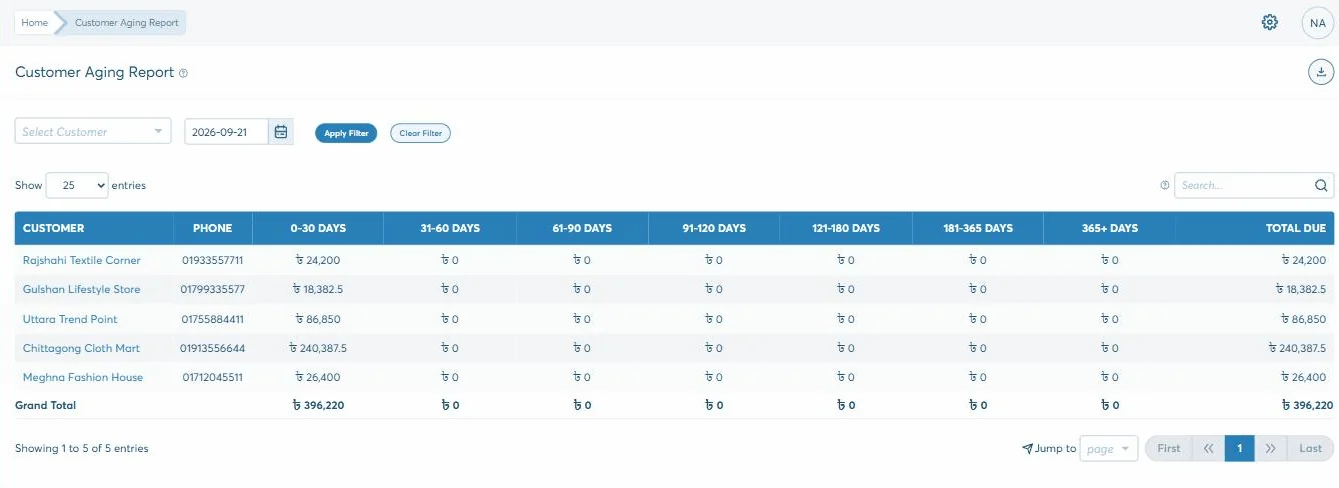
Customer ageing
Orders
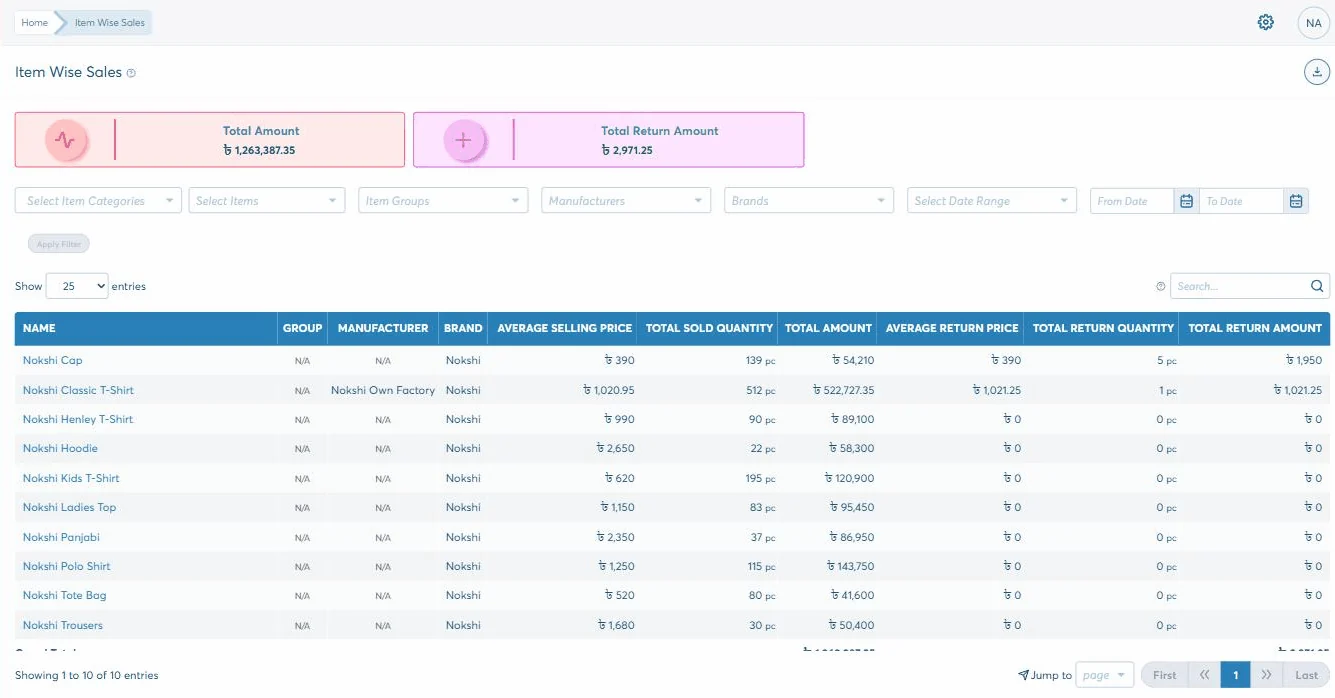
Item sales
Payments
1 of 6
And the revenue itself is not in this module at all — it is the Sales and Accounts Receivable lines on the profit and loss, moved by these same invoices. The sales figure and the accounts figure cannot disagree, because there is only one of them.
Getting started
How sales gets running
How long it takes depends on how you work and what has to come across from wherever it lives now. That is what the second step is for — and nothing is committed before it.
1
Start the trial
30 days, no card, nothing to install. Put a real week of your own work through it rather than a demo of ours.
2
A short discovery
We go through how you actually work — the documents, who should see what, and what has to come across into sales.
3
Set up and trained
Modules configured to that, roles set screen by screen, and your team taken through the parts they will each use.
4
Live, and still answered
Phone, email or online, from the team that built it. Nobody hands you to a reseller once the invoice is paid.
Questions
What a sales manager asks about it
Can I deliver an order in parts?
Yes, and invoice it in parts too — they are independent. Each line of the order tracks ordered, delivered, billed and returned quantities, and the order stays open until there is nothing left in any of them.
How do I find orders that shipped but were never invoiced?
Filter the order list on delivery status Delivered and invoice status Not Invoiced. They are separate filters on the same screen precisely so that question has a one-step answer.
Do quotations expire?
Every quotation carries a valid-till date, shown in its own column, with its own date-range filter so you can pull the ones about to run out. When a quote becomes an order its status changes to Ordered and the order carries the quotation number.
Can a customer pay several invoices with one transfer?
Yes — that is what batch payment is for. You can also take a single invoice in instalments; the invoice row shows its total, what has been paid and what is still due either way.
Where do shop sales and one-off sales show up?
In the same invoice list, on their own prefixes — a counter sale as POS/INV, a direct sale against its own document number. The running totals across the top cover all of them, so the day’s sales are one figure.
What happens when a customer sends something back?
A return goes against the order it left on, so the returned quantity appears in that order’s own column. Where you owe them money rather than goods, a customer debit — a credit memo — is issued and can be applied against their next invoice, with what is issued, applied and remaining tracked separately.